Showing posts with label and. Show all posts

Saturday, 29 July 2017

Creating libraries and linking to libraries in Vala

Creating libraries and linking to libraries in Vala


This is an example of how to create a library in vala, and how to access it using several different methods. This example includes:
  1. A shared library written in vala, including
    • shared object (.so), and how to install it
    • headers (.h), and
    • bindings (.vapi)
  2. A command-line tool that uses the library by direct-linking
  3. A dbus server that uses the library by direct linking
    • makes the library available to other dbus-aware applications
    • self-terminating process after use (not a daemon)
  4. A command-line tool that uses the library via dbus and the dbus-server.

The first half of the example is based on the official vala tutorial library example,
I have added dbus connectivity and a bit more explanation that I found helpful.


1) Create an empty directory. These steps create a lot of files!

 $ mkdir test_library
$ cd test_library


2) Create the library. Save this file as libtest.vala:

// BEGIN
public class MyLib : Object {

public string hello() {
return "Hello World from MyLib";
}

public int sum(int x, int y) {
return x + y;
}
}
// END


3) Create the .c, .h (C header), and .vapi (vala binding) files:
 -C --ccode Output C code instead of compiled
-H --header=file Output C header file
--library=name Assign name to library
--vapi Assign name to vapi file
-b --basedir=dir Use dir as the base source dir (For me, this is unnecessary)

$ valac -C -H libtest.h --library libtest libtest.vala --basedir ./


4) Compile the library using:

 -shared Create a .so shared object
-fPIC Position Independent Code (PIC) suitable for use in a shared library
$(pkg-config --cflags gobject-2.0)
Output: -I/usr/include/glib-2.0
-I/usr/lib/i386-linux-gnu/glib-2.0/include
-o filename Output filename

$ gcc -shared -fPIC -o libtest.so $(pkg-config --cflags --libs gobject-2.0) libtest.c


5) Create the command-line application that uses the library by linking.
   Save this file as hello.vala:

// BEGIN
void main() {
var test = new MyLib();

// MyLib hello()
stdout.printf("%s ", test.hello());

// MyLib sum()
int x = 4, y = 5;
stdout.printf("The sum of %d and %d is %d ", x, y, test.sum(x, y));
}
// END


6) Compile the command-line application.
Using vala, there need to be TWO links:
  • The vala link to a .vapi file (in this example, test.vapi)
  • The gcc link to a C library (in this example, -X -ltest to add libtest.so)

 - The vala link to a .vapi file (in this example, test.vapi)
- The gcc link to a C library (in this example, -X -ltest to add libtest.so)

-X --Xcc=-I. Pass the -I. (include current directory) to gcc.
GCC will look for shared libraries in the current directory first
-X --Xcc=-L. Pass the -L. (add current directory to search path) to gcc.
-X --Xcc=-ltest Link library "libtest" which we just created in the current directory.

If we had the libtest.so in the local directory, we could use:

$ valac -X -I. -X -L. -X -ltest -o hello hello.vala libtest.vapi


7) Test the command-line application that uses the library:
The library is in the local directory (uninstalled):

 $ LD_LIBRARY_PATH=$PWD ./hello
Hello World from MyLib
The sum of 4 and 5 is 9


8) We cannot easily use the local library for dbus.
So install the library to the expected location.
Copy the library to /usr/lib using:

 $ sudo cp libtest.so /usr/lib/


9) Test the (installed) command-line application:

 $ ./hello
Hello World from MyLib
The sum of 4 and 5 is 9


10) Create the dbus server that uses the library.
A server listens for requests from other applications. This server acts as a gateway: It translates other application requests for library methods into a library call, and then sends the response back across dbus to the original requestor.

Save this file as dbus_server.vala:

// BEGIN
// Source: https://live.gnome.org/Vala/DBusServerSample#Server

[DBus (name = "org.example.Demo")] // dbus interface name
public class DemoServer : Object {

/* Functions that access the library on the Demo interface
* Note the LACK of in the return strings.
* Vala automatically mangles my_function_name into the
* standard Dbus camelcase MyFunctionName
* So a function is "hello()" here, but "Hello" on Dbus
*/
public string sum () {
var test = new MyLib();
int x = 4, y = 5;
return "The sum of %d and %d is %d".printf( x, y, test.sum(x, y));
// Note the LACK of in the return strings
}

public string hello () {
var test = new MyLib();
return "%s".printf( test.hello());
}

}

[DBus (name = "org.example.DemoError")]
public errordomain DemoError { SOME_ERROR }

/* Dbus functions */
void on_bus_aquired (DBusConnection conn) {
try {
string path = "/org/example/demo";
conn.register_object (path, new DemoServer ());
} catch (IOError e) {
stderr.printf ("Could not register service "); }
}

void main () {
GLib.MainLoop loop = new GLib.MainLoop ();
GLib.TimeoutSource time = new TimeoutSource(3000); // 3 sec
GLib.BusType bus = BusType.SESSION;
string destination = "org.example.demo";
GLib.BusNameOwnerFlags flags = BusNameOwnerFlags.NONE;

Bus.own_name ( bus, destination, flags,
on_bus_aquired,
() => {},
() => stderr.printf ("Could not aquire name "));

// Use timeout to quit the loop and exit the program
time.set_callback( () => { loop.quit(); return false; });
time.attach( loop.get_context() ); // Attach timeout to loop

loop.run (); // Listen for dbus connections

}
// END


11) Compile the dbus server:
 Dbus requires the gio package (--pkg gio-2.0)
-X --Xcc=-I. Pass the -I. (include current directory) to gcc.
GCC will look for shared libraries in the current directory first
-X --Xcc=-L. Pass the -L. (add current directory to search path) to gcc.
-X --Xcc=-ltest Link library "libtest" which we just created in the current directory.

Since the library is installed, we can ignore those local directory flags:

$ valac --pkg gio-2.0 -X -ltest dbus_server.vala libtest.vapi


12) Create a dbus .service file, so dbus knows how to find our new dbus_server.
Save this file as dbus.service. Your third line will vary - use the real path:

// BEGIN

[D-BUS Service]

Name=org.example.demo

Exec=/home/me/vala/library/dbus_server

// END


13) Install the dbus service file:

 $ sudo cp dbus.service /usr/share/dbus-1/services/org.example.demo.service


14) Test the dbus server using an existing command-line application, dbus-send.
This is a command-line application using the library via dbus, using dbus_server for its intended purpose as a gatetay.

The sender is different each time because dbus-send creates a new process and connection each time it is used.
The destination is different because the server terminates after 3 seconds.

 $ dbus-send --session --type=method_call --print-reply 
--dest="org.example.demo" /org/example/demo org.example.Demo.Hello
method return sender=:1.3173 -> dest=:1.3172 reply_serial=2
string "Hello World from MyLib"

$ dbus-send --session --type=method_call --print-reply
--dest="org.example.demo" /org/example/demo org.example.Demo.Sum
method return sender=:1.3175 -> dest=:1.3174 reply_serial=2
string "The sum of 4 and 5 is 9"


15) Clean up:
Remove the dbus service file:
Remove the test library from /usr/lib

 $ sudo rm /usr/share/dbus-1/services/org.example.demo.service
$ sudo rm /usr/lib/libtest.so
{ Read More }


Tuesday, 25 July 2017

CrossOver 16 0 0 Released Based Wine 2 0 and Supports Microsoft Office 2013

CrossOver 16 0 0 Released Based Wine 2 0 and Supports Microsoft Office 2013


CrossOver Linux is a commercial product that provides Linux users with an easy way (yet expensive) to install various applications and games that run only on the proprietary Microsoft Windows operating systems.

Technically, the application is a GUI (Graphical User Interface) front-end for the well known Wine software, which provides a set of APIs and libraries to emulate several Microsoft Windows OSes on top of an open source Linux-based operating system.

Features at a glance

By default, the program comes with support for a very large selection of Windows applications, allowing users to install and use them without the need for a Microsoft Windows license. However, this does not mean that you won�t have to own a specific software license.

It is distributed as free for 30 days binary packages that support the Ubuntu 12.04 LTS or older distributions, Ubuntu 12.10 or newer, Linux Mint 14 or newer, Debian GNU/Linux Wheezy or any other distro that uses Debian packages, as well as Red Hat, Fedora and other RPM-based operating systems.


Whats new in CrossOver 16.0.0

Application Support:

  • CrossOver now supports Microsoft Office 2013!
  • Microsoft Office 2013 can be activated with either an Office 365 subscription or a product key.
  • Core Technology Improvements:
  • CrossOver 16 is based on Wine 2.0, with thousands of improvements to Windows compatibility across the board.
  • CrossOver now supports 64-bit Windows applications, with new bottle templates and 64-bit dependency management.

Bug Fixes:

  • Quicken 2014-2016 updates will now apply automatically during installation.
  • Fixed a bug which prevented saving very large files in Microsoft Excel 2010
  • Fixed a bug which prevented opening hyperlinks from documents in Microsoft Office 2010.
  • Shell folder links will now be updated when importing bottles into CrossOver from an archive file.
  • Fixed an audio bug which could cause Blizzard games to emit unwanted noises from the speaker.
  • Fixed a bug in Tencent QQ which caused the application to hang when adding a new contact.
  • Rollercoaster Tycoon 2 will display correctly again.


How to Install CrossOver on Ubuntu / Linux Mint and Other Platform :

To Install CrossOver 16.0.0 on Ubuntu 16.04 Xenial Xerus, Ubuntu 15.10 wily werewolf, Ubuntu 15.04 vivid Vervet, ubuntu 14.10 Utopic Unicorn, Ubuntu 14.04 Trusty Tahr (LTS), Linux Mint 18, Linux Mint 17.3 and other Ubuntu derivative systems, open a new Terminal window and bash (get it?) in the following commands:

Download trial version on this link : https://www.codeweavers.com/products/crossover-linux/download


or, open terminal and follow this command :
wget https://media.codeweavers.com/pub/crossover/cxlinux/demo/crossover_16.0.0-1.deb
and install deb package :
sudo dpkg  -i crossover_16.0.0-1.deb

After installation is finiahed, search CrossOver on Ubuntu dashboard


{ Read More }


Monday, 24 July 2017

Convert your files into other Formats Online and for Free!

Convert your files into other Formats Online and for Free!


image It�s quite a hassle to convert files into different formats, as very often, you don�t have too many options to choose from, and are left helpless, not knowing what to do and where to find what you are looking for. How about I tell you that now it�s possible to do over 50 file conversions online, for FREE!

CometDocs is an all-in-one, user-friendly, file and data conversion tool that allows over 50 different conversions. The good news is that you don�t have to install anything on your computer� It�s available online.

How does it work?

  1. Select the file you wish to convert into a different format
  2. Choose the type from the options given (for example: from PDF to Excel)
  3. Enter your email address in the space provided
  4. Click on the button �Send�. Within no time, you will receive your conversion output via email.
  5. Download the file and bingo, the job�s done!

No hassles, no complications! It�s downright easy!

Make the job even simpler!

CometDocs allows you to convert 3 pages at a time if you haven�t registered with them. With just a one time �sign up� for an account with them, you can do away with all limitations.

  1. You will not be asked to enter your email address every time you want to use this tool.
  2. You will receive faster document conversions.
  3. You will also be able to retrieve them directly from the file manager and store the files there for use at a later stage.

It�s unique features:

  1. On the fly OCR conversion capabilities
  2. Over 50 different conversion options
  3. Proprietary XPS and PDF conversion abilities that retains formatting, images and text in the selected output format.

Interested in getting a list of CometDocs Conversion types? Visit the FAQ section on CometDocs.com to learn more.

Link: CometDocs

{ Read More }


Sunday, 23 July 2017

COOKING ACADEMY 3 FIRE AND KNIVES español oficial

COOKING ACADEMY 3 FIRE AND KNIVES español oficial


Sinopsis:

Agarra tus guantes de cocina y ponte el sombrero de su chef! Cooking Academy es el juego que te pone en las cocinas de una prestigiosa escuela culinaria! A partir de rollos de huevo a las crepes, a cr�me brulee, depende de ti para preparar m�s de 50 recetas diferentes!
Aprende curiosidades acerca de la comida, mientras que el dominio de las habilidades de cortar, amasar, m�quina, mover de un tir�n, fre�r, y mucho m�s! Desbloquea nuevas recetas y trofeos al superar los cursos y ex�menes de cocina.
�Est�s listo para ser un chef de primera?

* Recetas �nicas
* Un mont�n de minijuegos
* Cursos emocionantes para dominar
* Trofeos Logros Especiales
* Convi�rtete en un maestro de cocina!

Gracias por el juego Lively!
Desarrollador: Fugazo
Fuente: Magnoliajuegos
Gracias por compartir!

Requisitos Del Sistema:

SO: Windows XP / Windows Vista / Windows 7 / Windows 8
CPU: 1.0GHz
Memoria: 512 MB
DirectX�: 9.0
Disco duro: 1380 MB espacio en disco duro.


Descargar: Espa�ol... Links intercambiables!!!

DepositFiles:

http://dfiles.eu/files/hq32kuo0k


UserCloud:

https://userscloud.com/wxdqv47edjgt


   Acceso a enlaces VIP  

(click en la imagen)


??????????????????????????????????????
{ Read More }


Create fake Facebook Post Message and Twitter Tweets for fun

Create fake Facebook Post Message and Twitter Tweets for fun


Facebook and Twitter are the right places to make anything reach a lot of people. We come across many fake funny conversations that are being posted on Facebook and Twitter. They may be between politician and a common man or between a cricketer and a selection committee member. Have you ever felt excited and thought of creating one?
Create fake Facebook Post
If you are looking for the right source to create fake Facebook Status and Tweets, then this article would be a great help for you. I will take you through few online sources, which helps you create such fake Facebook Status and Tweets easily.

Create Fake Facebook Post and Tweets

Creating such funny fake Facebook Status and Tweets is easy. There may be many sources and tools, but I would take you through free and best sources and here are they.
The Wall Machine � Create fake Facebook status
The Wall Machine is really a fun tool for creating fake Facebook status posts for free. Initially, you need to login, using your Facebook account and the fun begins soon thereafter.
You can upload the picture of the person and start typing the status. It allows you to add the people, who you want to �Like� the post and edit the time of post. It provides options to add comments along with profile pictures to the post created � and this is really exciting. They generate examples for everything you want to add and you need to edit them. You can add friendship update, relationship update, events and more.
Fake Facbook Wall Post
After you are done with adding the status and comments, you can save it as an image. While saving, it asks you to enter the title and tags to make it available for everyone as fun Facebook images. You can save it as Public or Private. Once you click on the Save button, you can share it to your Facebook or to any social networking website.
Status Clone � Create fake Facebook message without login

Status Clone allows you to create fake Facebook Status using the Classic and the Timeline format. It does not require any login. So, people who do not use Facebook or do not wish to login using Facebook, can make use of Status Clone to create fake Facebook Post.
Status Clone-fake facebook status
In this case, you need to enter the name, status text, upload the image, people whom you want to Like the created post and comments. While you are adding these things, you can see the preview of your fake post being shown beside. Once done, click on �Create Image and Save�. You can share the created fake post anywhere you want.

Simitator � Create funny Facebook chat

Simitator helps you to create not only fake Facebook Status, but also fake Facebook chat. You can create a fake Facebook chat which looks like you had a chat with say a cricketer or a film star or any other celebrity. Creating fake Facebook chat is the most exciting thing being done using Simitator. You can preview the chat you are creating and download the image once done.
Fake Facebook Chat

Lemme tweet that for you- Create fake tweets

Lemmetweetthatforyou allows you to create fake Tweets for fun. Just visit the website and enter the username of the person you want to create the Tweet for. It automatically updates the profile picture by searching in Twitter. Then, type the tweet you want. You can even edit the number of Retweets and Favorites.
Create Fake Tweet
It also allows you to edit the time and date of the Tweet created. Once done, save it as an image, by just taking the screenshot or share it to your Twitter account.
{ Read More }


Count number of characters in file from command line and Vim

Count number of characters in file from command line and Vim


The command wc prints several file statistics: bytes, lines, words, etc. Using the -m option we can count the number of characters in a text file.

Install

Open a terminal window and run:

wc -m FILE

We can count the number of characters from Vim editor using this ex command:

:!wc -m %

References

wc(1) - Linux man page
{ Read More }


Saturday, 22 July 2017

Copy files and change name with PowerShell

Copy files and change name with PowerShell


A friend of mine asked if I could copy files from one folder to another and rename them according to the following format

YYYYMMDDHHMMSS.ext

here  source code:


 cls 
$source="C: ext72source"
$destination="C: ext72destination"
set-location $source
$files=get-childitem -Recurse
foreach ($file in $files)
{
if (!$file.PsIsContainer)
{
$newName=$destination+""+[string]$file.LastWriteTime.Year +
[string]$file.LastWriteTime.Month +
[string]$file.LastWriteTime.Month +
[string]$file.LastWriteTime.Day +
[string]$file.LastWriteTime.Hour +
[string]$file.LastWriteTime.Minute +
[string]$file.LastWriteTime.Second +
[string]$file.Extension
Copy-Item $file.FullName $newName
}
}

Then change source and destination variable in the script.
{ Read More }


Create Time lapse with FFMPEG and Windows

Create Time lapse with FFMPEG and Windows


A recent project I worked on was to create a time lapse of the building of my brother in-laws house. The camera itself was basically a Raspberry Pi that was set up to take a picture every half hour from 6 am to 9 pm. This was accomplished with a simple cron script that ran based on the time of the system clock. There was some drift because it was not connected to the internet and could not get any information from NTP. So it was all based on the time that was set after booting, and since it was powered by a solar panel and battery it could be set up for 3 months without interruption. The only downside was that the 16GB USB stick could not store all the photos for the entire time the camera was taking pictures. It also acted as an access point with a WiFi card so you could SSH into it and monitor the photos folder or download some images without having to take the camera down.

When it was finished, there were a total of 6145 photos, spanning just a little under six months. I found the easiest way to create a time lapse from that many images was to use FFmpeg. It works a little different on windows as it does on Linux, because it doesnt actually install anywhere and it is just an archive file that gets extracted. After downloading, it placed it in a folder called tools on the C: drive and opened the command prompt in C: oolsffmpeg in. (Note the bin folder... That is where the executable for FFMpeg is.)

The command to compile the video was:

C:ffmpeg in>ffmpeg.exe -f image2 -framerate 15 -pattern_type sequence -start_number 0001 -i C:ImagesIMG_%04d.jpg C:Outputvideo.avi

-f image2 is the input format
-framerate 15 is setting the video at 15 frames per second
-pattern_type is for using filenames matching the glob pattern set in -i
-start_number is telling FFmpeg to start at image number 0001
-i is the input files, with %04d setting the number with four digits

At the end of it all, I had a pretty nice 5 minute time lapse at about 300 MB in size.


{ Read More }


Thursday, 20 July 2017

Cross database pagination problem and how we solved it

Cross database pagination problem and how we solved it


When we are developing a webapp with any type of listing, pagination is a must have feature. From the UI perspective we can use infinite scrolling or pages approach.

If you are familiar with google search this is how google uses the second approach,


Now the problem is how we generate listing for a particular page?
Lets take a hypothetical library application where we need to list down existing books, assume we need to list 10 books per page.

This is how we query books to generate the 1st page,
SELECT * FROM BOOKS LIMIT 10;
to generate the 2nd page,
SELECT * FROM BOOKS LIMIT 10 OFFSET 10;
So easy,  by providing the offset value we can dynamically generate our pages.

BUT can we use the same across database types?

If you know the exact backend DB type you gonna use in production, lucky you!
But if you are developing a product which needs to support multiple DB types (MySQL, Oracle, Postgres, H2 ....) above query will fail in some of them. For example above will work in MySQL, H2 and Postgres but will not work in Oracle.

In Oracle 11g you can run following but not in 12c
SELECT *
FROM (
SELECT b.*, ROWNUM RN
FROM (
SELECT *
FROM BOOKS
ORDER BY ID ASC
) b
WHERE ROWNUM <= 10
)
WHERE RN > 10
 
Now lets discuss how we solved this problem. Following is high-level architecture of the solution.


In this scenario we have exposed all CRUD operations as OSGI services to the outside world. This component may or may not have DB specific logic. But for sure we dont have any DB type specific logic within our main OSGI component. We have delegated all those DB type specific logic to the DB Adapter.

What are the DB type specific things we can have?

1. Above pagination related stuff (LIMIT, OFFSET)
2. Auto generate key usage(getGenaratedKeys)

How to load correct DB Adapter class through reflection

We can maintain a configuration file where we state the DB Adapter class. Then read that class name within our main component and use/call through reflection.

Reference

http://www.jooq.org/doc/3.5/manual/sql-building/sql-statements/select-statement/limit-clause/

{ Read More }


Wednesday, 19 July 2017

Copy and paste from the system clipboard with vim

Copy and paste from the system clipboard with vim


Often, when using vim, highlighting text in the terminal to copy-and-paste it around is plausible.  This is definitely true when on a true terminal.  I use the rnu option so that I have relative line numbers on each line.  So copying multiple lines with the mouse grabs the line number with unwanted indentation.  When I need to move code around it is annoying to have to manually remove the numbers.

To understand how to get vims clipboard to match your systems you need to understand vim registers.  On a computer we usually only get one clipboard.  Every time we ctrl-c, the contents of the clipboard are discarded and replaced with whatever is highlighted.  We dont have any option to copy multiple objects and then paste them around.  However vim has multiple "registers" where text can be copied and pasted from.  To see the registers type :reg in command mode.

The register that we are interested in is register +.  To test it out, copy some text from another application then run :reg and see the contents displayed in register +.

So now we just need to know how to access the contents of register +.  Register access is done with ".  To paste from they keyboard we type "+p  To copy, for example an entire line, into the system clipboard we type "+yy  To delete the current line and store it in the system clipboard we type "+dd

We can also use registers with visual mode.  If we wanted to copy the line underneath the cursor we would type V"+y  We could copy the next three lines into the system clipboard by typing Vjj"+y

To sum it up, to use the system clipboard to copy and paste in vim simply do what you would usually do in vim, then prepend "+ to your y (yank) or p (paste) command.

Update:
Depending on the version of vim you are using, the register for the clipboard may work differently. In some cases the * and + registers are the same register. If you want to find out which register is for your system clipboard, simply copy some text from anywhere into your clipboard, then run :reg. Whichever register has the text you copied is the register that holds the contents of your clipboard.
{ Read More }


Sunday, 16 July 2017

CrossOver Preview runs Windows apps on Android and Chromebooks even Photoshop

CrossOver Preview runs Windows apps on Android and Chromebooks even Photoshop


Last week, CodeWeavers announced that after three years of development, a preview version of CrossOver for Android would be released. Why was I so excited? Because CrossOver allows you to run Windows programs on Mac and Linux, and they brought their expertise over to Android. After trying out the Preview version out for a week (which you can sign up for here), Im extremely impressed by its capabilities, despite some major limitations.

Disclaimer: Since I do not own an Intel-based Android tablet, and my Chromebook does not yet have the Google Play Store, I tested CrossOver on the latest version of Remix OS on my Dell Windows laptop. It is possible that some of the bugs I experienced are issues with Remix, but CrossOvers compatibility with Windows programs is identical no matter how you run it. CrossOver for Android is in early beta, so everything in this review is subject to change with subsequent updates.

First impressions

CrossOvers entire user interface consists of the virtual desktop, where all the Windows programs live, and an Install Application button. The installer functionality is where CrossOver shines on the desktop. With the WINE open-source project that CrossOver is based on, getting a program to run (even at all) can mean hunting down forum posts to see what LinuxFan78 typed in the command line.
CrossOver tries to alleviate this pain with their installers, which downloads a given program and performs all the necessary tweaks for the program to run automatically. For example, when I installed Steam through CrossOver, it downloaded multiple fonts that Steam requires before proceeding with the actual Steam installation.
Screenshot_20160902-135710
CrossOver for Android only has a few known-good applications, but if you so desire, you can try installing any of CrossOvers available applications. The selection is fairly expansive, but if you want to install something not listed, youll have to download a web browser like Firefox inside CrossOver and download it manually.

The virtual desktop is fairly basic, showing some app shortcuts at the top and a Start menu with access to your programs at the bottom. Theres also a very basic file manager, a setting to add/remove programs, and the Wine configuration tool.

Games

Perhaps the most exciting prospect of running Windows programs on Android (or a Chromebook) is playing Windows vast library of games. Thats a huge reason Wine even exists, despite the rise of Steam OS and Linux gaming, most new titles are still locked to Windows. Linux and Mac users have used Wine, CrossOver, and other similar software for years to play Windows-exclusive titles.
Screenshot_20160902-120940
Steam is easy to get up and running, just choose it from the Install Application dialog and click Next/Accept on all the installer popups. But trying to play games is where I ran into problems. Wine, and thus CrossOver, only supports DirectX 9 - meaning most new Windows games will just plain not work. CodeWeavers is working hard on adding DirectX 10 and 11 support, but its a massive undertaking. Many games also offer an OpenGL mode, except that doesnt work here either. Android only supports OpenGL ES, not the full OpenGL spec that Windows programs expect.
Another frustrating problem is games cannot lock the mouse inside the program. To my understanding, Android doesnt allow applications to lock the mouse at all, so FPS titles wont be playable without a controller. Games running in full-screen seem to be buggy as well, but most games have windowed modes anyways. Finally, theres no way to change the resolution of the virtual desktop, so older games expecting a smaller screen might have problems.
Screenshot_20160902-122228
I didnt try many of my Steam games, but I did successfully run three titles - Half Life 1, Team Fortress: Classic, and Game Dev Tycoon. Half Life 1 (pictured above) only worked when I disabled full-screen mode and switched to software rendering instead of OpenGL. The mouse didnt lock so it was uncontrollable, but moving around was buttery smooth. Team Fortress was the same story, and Game Dev Tycoon surprisingly worked without messing with the settings.

If your game can run either on software rendering or DirectX 9, and doesnt need to lock the mouse, theres a good chance it might run in CrossOver. Especially if you install it through CrossOvers install mechanism. As stated earlier, CodeWeavers has been working on DirectX 10 and 11 support on the desktop versions of CrossOver, so it wouldnt surprise me if those changes trickle down to the Android version at some point.

Other software

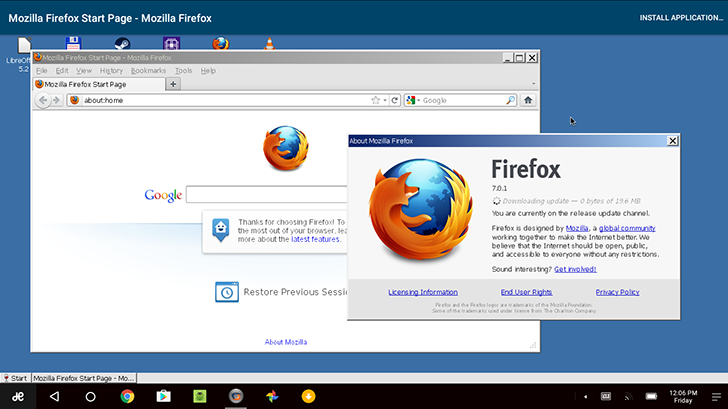
Youll need to use a web browser to install software not available in CrossOver itself. I used CrossOvers installer to download Firefox, seen below. I tried to run a recent release, version 45 to be exact, but it froze whenever I saved a file so I switched back to Firefox 7 (which is still usable for most sites).
Screenshot_20160902-120700
One of the best use cases for CrossOver is to run full Microsoft Office, but Office 2013 and newer dont work at all thanks to their dependence on DirectX 10. CodeWeavers officially supports Office 2010 and earlier, but I didnt have a copy of that version, so I tried out LibreOffice. If youve never used it, LibreOffice is an open-source office suite with MS Office compatibility, and it works fairly well in CrossOver.
Screenshot_20160902-122736
Granted, it worked until I tried to save a file, then it froze. So close!

Holy Photoshop, Batman

I was incredibly surprised to see my copy of Photoshop CS3, without changing any settings, worked in CrossOver. Well, mostly.
Screenshot_20160902-123432
I tried basic image manipulation including transforms, gradients, cropping, filters, etc, all with success. However, it does crash when trying to use fonts, and a few other times randomly, but its extremely impressive that CrossOver can run it at all. Photoshop CS6 requires some extra packages in Wine, known as winetricks, to run perfectly - but as far as I can tell, there is no way to install winetricks in CrossOver yet.

Android/Chromebook integration

CrossOvers integration with the host operating system, be it Android or Chrome OS, is rather limited but still more than I was expecting. The root Android file system shows up as a drive in CrossOver, allowing you to transfer data back and forth without too much trouble. For example, I could easily open pictures in Photoshop from the Android downloads folder.

The newest CodeWeavers coupon promo code is ( WEAVEME ) save 25% off CrossOver Mac or Linux today!

Full Article
{ Read More }


Saturday, 15 July 2017

Create and Format bootable USB flash drives with Rufus

Create and Format bootable USB flash drives with Rufus


Rufus stands for the Reliable USB Formatting Utility with Source. It is a tiny and lightweight utility for Windows PC, that helps to easily format, as well as create USB drives, such as USB keys, memory-sticks, and USB pen-drives etc., which are bootable and user-friendly. It has advanced and standard options to suit all the skill levels.
Create bootable media easily

This tool has a user friendly interface which looks like the built-in format panel of Windows. We can choose a partition scheme, device, cluster size, target system type, new volume label and file system types � like NTFS, FAT32, exFATand UDF..
There are a few basic formatting options available, which help us check the device to see if there are any bad blocks. It also helps in the selection of algorithms (from type 1 to type 4), we can create an extendable label, quick format mode and icon files. A bootable disk is created using the ISO image. Rufus tool records all the activities to a different panel, and it is saved into a log file.
This multifaceted tool is useful when:
  • USB installation media need to be created from bootable ISOs (Linux, Windows, and UEFI)
  • A person wants to work on a computer in which an OS is not installed
  • For the purpose of flashing a BIOS or any other DOS, firmware is required
  • A person wishes to run a low-level utility.
New features in Rufus 2.1.649:
  • 32 bit support range for UEFI: NTFS boot
  • Addition of Advanced mode stand-alone UEFI: NTFS with boot installation
  • Disable support for hidden GRUB version ISOs
  • Repair and correct Windows UEFI installation related issues while using GPT/NTFS.
  • generating a repair of 32 bit installation flash drives in UEFI Windows 10.

Rufus for Windows free download

Rufus is arguably the best solution for creating and formatting a bootable USB drive. Download your copy of Rufus from the official website here.
{ Read More }


Create shortcut icons for shutdown restart and logout in windows 8

Create shortcut icons for shutdown restart and logout in windows 8


In windows 8, to access shutdown, restart and logout, we need to move our mouse in the top right corner and then use these options from the Settings>Power button. But what if you could get extra buttons for shutdown, restart and logout right on your desktop or in your taskbar, or in your taskbar?
Well, In this post, Ill tell you how to create shortcuts for shutdown, restart and logout in your task bar from where you can perform these actions just in a single click. simply follow the steps:
1. Right click on your desktop and click New > Shortcut.

new shortcut
2. Now type shutdown.exe /s /t 0 in the create shortcut box and click NEXT.

create shortcut

3. Now type the name of the shortcut, such as shutdown and click FINISH.

shutdown

4. Now a shortcut icon will be created on your desktop. Right click over this icon and click PROPERTIES. Then click CHANGE ICON.

change icon

5. Now select any icon you like and click OK. The icon of your shortcut will be changed.

select any icon

6. Now, you can drag it and drop into your taskbar to make it a shutdown button. In the same way, you cancreate shortcut buttons for logout and restart also. Use the following text for step 2:
Logout : shutdown.exe /l
Restart : shutdown.exe /r /t 0
Thats it. You have created your shortcut icons for shutdown, logout and restart. You can download the buttons from this link also.
{ Read More }


Wednesday, 12 July 2017

Create and Run Apache Spark Scala project using Eclipse and SBT

Create and Run Apache Spark Scala project using Eclipse and SBT


This post shows a simple way to create and run a apache spark scala project using eclipse and SBT. Following this post at link (http://czcodezone.blogspot.sg/2015/11/create-scala-project-using-scala-ide.html) to create a SBT-compatiable scala project in Scala IDE, open the build.sbt in the project and add the following line towards the end of the file.

libraryDependencies += "org.apache.spark" %% "spark-core" % "1.5.1"

Further more, since Spark needs to run a spark cluster in a jar, a sbt plugin must be added for the packaging. Create a file named "assembly.sbt" in the "project" folder under the root directory and put the following content:

addSbtPlugin("com.eed3si9n" % "sbt-assembly" % "0.11.2")


Now in the command line, navigate to the project root directory and run "sbt compile", "sbt package" command after you put in your spark scala code, then "sbt run" or "spark-submit" depending on whether you want to run it locally or submit to spark cluster
{ Read More }


Sunday, 9 July 2017

Counter Strike Global Offensive First Impressions and Screenshots

Counter Strike Global Offensive First Impressions and Screenshots


Counter-Strike is a popular series of first-person shooter games from Valve (Half Life, Left 4 Dead, Team Fortress) and the fall of 2012 saw their most recent release in the series, Counter-Strike: Global Offensive [CS:GO]. This past weekend was a Steam Free Weekend and I took part in the global offensive and had a great time - that is, once I was able to install and connect with the game. It must have been a jam-packed party because this error came up more than once at first:


After installing, I maxed out the settings and dove in. I played the original Counter Strike in 2000 ("Terrorrissss WIIIIIIIIINNN") but didnt play the remake, Counter-Strike: Source in 2004; but from what Ive seen of screenshots and gameplay videos from that edition, CS:GO is yet another graphical step up in visuals.

Just outside an office building in the Office level/map, an example of graphics in Counter-Strike: Global Offensive. 

The core gameplay has the opposing sides, Terrorists who attempt to plant bombs, maintain hostages and take out their enemies, the Counter-Terrorists, who are trying to disarm bombs, rescue hostages (via follow-the-leader actions) and take out the Terrorists in general [are these terms flagging this blog now? haha].


The category of "Classic" gameplay is bomb planting/disarming and hostage dealings. There is also a "Demolition" game type, with bomb planting and defusal; but where you cannot pick your gear when the round starts. Instead, you are awarded the next, pre-chosen weapon as you get kills with your currently-assigned one. There is also "Arms Race", where everyone starts out with the same weapon and each kill immediately awards the next weapon in a progression through [what seems like all the] weapons until finally a Golden Knife, where the first team to have someone reach this level and get the knife kill wins the match. In Arms Race, spawns are instant for each side.


The graphics are definitely a step up from Counter-Strike: Source. Models are updated and there is higher polygon usage throughout. Although still looking slightly dated compared to other recent first-person shooter games (the graphical Source Engine is about 7-8 years old, but constantly updated) CS:GO still holds its own with dynamic shadows, anti-aliasing, motion blur, area wounding and HDR rendering. Some maps, such as Dust, could have used more poly love, especially on the environment (buildings, cars) but perhaps since it is a remake map, they didnt want to change it too much. (It did have a nice amount of things on the ground, though). Office was an instant favorite and I spent most of my time there. Italy was beautiful, but suffered from over-bearing street cleaners, who apparently dont like to leave many boxes, crates, barrels and other miscellaneous (interactive or not) items on the ground [the ground seemed far too clean].


Textures were the Main Attraction in the update, in my opinion, as most were upgraded, sharp and detailed. Cement had clear pits/cracks and rug patterns were clear, clothing was textured sharply and metal had those little speckles in it. Almost all textures were crisp, except for what seemed like some leftovers from past maps, such as the books in Office on the shelf or some that just remained blurry at any distance despite having Anisotropic Filtering on maximum. Most however were greatly detailed, faces had stubble and pores. Wood Grain Everywhere. Polygon count for the important models (players and guns) were decent, even though the environment and objects (cars, sandbags, etc) on most maps could have used more complexity (I assume keeping the polys low were done so the game could be released on consoles and run better on older systems).


The actual gameplay itself was smooth and fast, but still felt somewhat mechanical. I hate hate hate hate [insert many more here] things like head-bobbing or the entire frame pitching and rolling as I move, but without some sort of effects like these during movement I felt like I was playing Tactical Ops (think Counter Strike mod for Unreal Tournament) from 1999. [Hey, dont get me wrong I loved TacOps and feeling like I was playing that game wasnt a bad thing at all, in fact it helped me enjoy this game!] What I mean is the movements of the models and the player felt distinctly middle-school (as opposed to old-school) as we all glided around the map and saw somewhat limited character animations. Perhaps that is a limitation of the Source Engine itself as it shows it age; but dont worry, the gameplay is still plenty action-packed and enjoyable as Valve does a great Makeover/Customization on the car that is the Source Engine. Bodies fly with rag-doll physics, crouching increases accuracy, headshots do critical damage,  teammates take damage (in Competitive Mode), blood splurts and marks walls and distinct sounds for each gun cracks and echoes throughout the map. Yes, there is still much fun to be had here, especially if you are a fan of the gameplay in the Counter-Strike Series of games.


For beginners, (those new to Counter-Strike, or those new to any first-person shooting games) there are very helpful text-based and obstacle-course types of tutorials within. One explains the heads-up-display and what the different parts of your screen is telling you, as well as the game modes and how to play them. The other runs you through the basics of shooting a weapon, aspects of the environment, and gives tips for better gameplay, like increasing your accuracy or going for headshots. There is even the ability to play against Bots only (computer-controlled characters) for practice and to get used to the mechanics of the game. You can even select various difficulties of Bots to play against to work on Achievements! I know that this alone will convert many people to purchase the game, especially when compared to other shooters that dont even give you the option to play with Bots at all *coughBF3cough*.

A practice shooting range on the Weapons Course, a training tutorial within the game.

For you Achievement Hunters, there are a ton of achievements, with various categories and ranking medals to show off. Want recognition for how many people you killed? Its in there. Want an award for playing as a team, whether its diffusing the bomb or handing out free guns like a gun-crazy socialist Canadian? [I Am Canadian lol] Its in there. Want achievements for sneaking around the entire match or wiping out the entire enemy team yourself? Its all in there. Over 150 achievements are yours for the taking - now get in there and start earning money, because only about a dozen people have earned the Earn Fifty Million Dollars Total Cash yet! 
[Stat source: Steam Max Players (50k), Steam Global Achievement Stats for CS:GO (.03%) at time of writing]


And now, more Screenshots!


Overall, Counter-Strike: Global Offensive looked better and still felt like Counter Strike while being a lot of fun to play. If that was the goal of the developers; Mission Accomplished! 


See You In The Games!


{ Read More }